
Cook for 2 or for 12
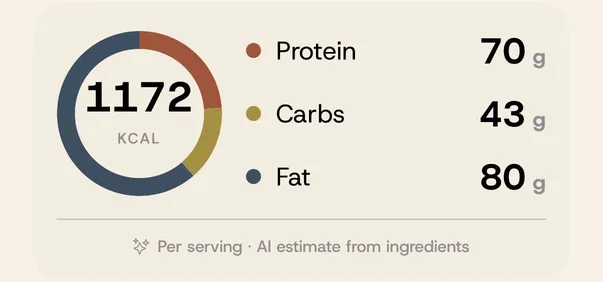
Change the servings and every amount rescales instantly. See protein, carbs, fat and calories for each serving, and read it all in grams or cups.


That reel you saved and never opened again? Share it to uCook and it becomes a real recipe: ingredients, steps, servings and macros, ready to cook.



No copying, no screenshots, no typing out ingredients.
A reel, a TikTok, a YouTube video or a recipe blog. Or paste a link, snap a photo, type a note.
Keep scrolling. uCook works in the background, even if you close the app.
Clean ingredients and steps, the creator credited and linked, filed in your library.
uCook doesn’t stop at saving. It helps you actually cook the things you save.
Change the servings and every amount rescales instantly. See protein, carbs, fat and calories for each serving, and read it all in grams or cups.
Cook mode shows one big, clear step at a time with the ingredients that step needs. Start timers right from the step, and the screen stays on while your hands are messy.

Plan breakfast, lunch and dinner from your own saved recipes, then add the whole week to your grocery list in one tap. Same ingredients across recipes are merged, so you buy exactly what you need.

Explore shows what other cooks are saving right now: trending dishes, new recipes and picks matched to your taste. Save one to your library in a tap.

Sort recipes into collections, filter by cuisine or meal, and find any dish in a second.
Breakfast, lunch and dinner for the week, with a gentle reminder on cooking days.
Ingredients from every planned meal, scaled and merged into one list.
Show grams and ml or cups and ounces. Switch any time, every recipe follows.
Snap a cookbook page or grandma’s recipe card, or paste any text.
“What’s for dinner?”, “Next step”. Ask hands-free while you cook.
Today’s meals, a recipe for tonight and your cooking streak at a glance.
Export to Paprika, a PDF cookbook or a JSON backup whenever you like.
One plan, everything included. No ads, no recipe limits to worry about.
$41.99/year
7-day free trial, then about $3.50 a month.
$4.99/month
Billed monthly. Cancel any time.
Prices in US dollars; your App Store shows your local price. Cancel in your Apple ID settings at least a day before the trial ends and you won’t be charged.
Instagram reels and posts, TikTok, YouTube, Facebook, any recipe website, photos (cookbook pages, screenshots, handwritten cards) and text you paste or type. On iPhone you can save straight from the share sheet without leaving the app you’re in.
uCook reads what the creator wrote: the caption, the creator’s own recipe page when the caption links to it (“link in bio”), the creator’s pinned comment, and the video’s subtitles where the platform has them. If a video only says the recipe out loud and has no subtitles or written recipe, uCook tells you instead of guessing.
uCook comes with a 7-day free trial. After that it’s $41.99 a year or $4.99 a month, with every feature included. You can cancel any time in your App Store settings before the trial ends and you won’t be charged.
iPhone and iPad running iOS 17 or later, with widgets, Siri shortcuts and a share-sheet extension on iPhone.
Yes. Pick any number of servings and every ingredient rescales. Each recipe also shows estimated protein, carbs, fat and calories per serving.
Always. Export your whole library as a Paprika file, a PDF cookbook or a JSON backup from Settings → Import & Export. You can also import from Paprika.
Download uCook and save your first recipe in seconds.
Download on theApp Store